Research your Turo market.
See supply, daily rates, estimated revenue, and utilization together.
 RentVerge.
 Add to Chrome — Free
THE CHROME EXTENSION FOR TURO RESEARCH
RentVerge is a Turo market analysis tool and Chrome extension that helps you compare vehicles, explore estimated revenue and utilization, and model ownership costs before buying.
Chrome extension for Turo research · Free plan · No credit card required.
FROM TURO SEARCH TO MARKET INSIGHT
Watch the actual workflow, from scanning listings to exploring the numbers behind your next vehicle.
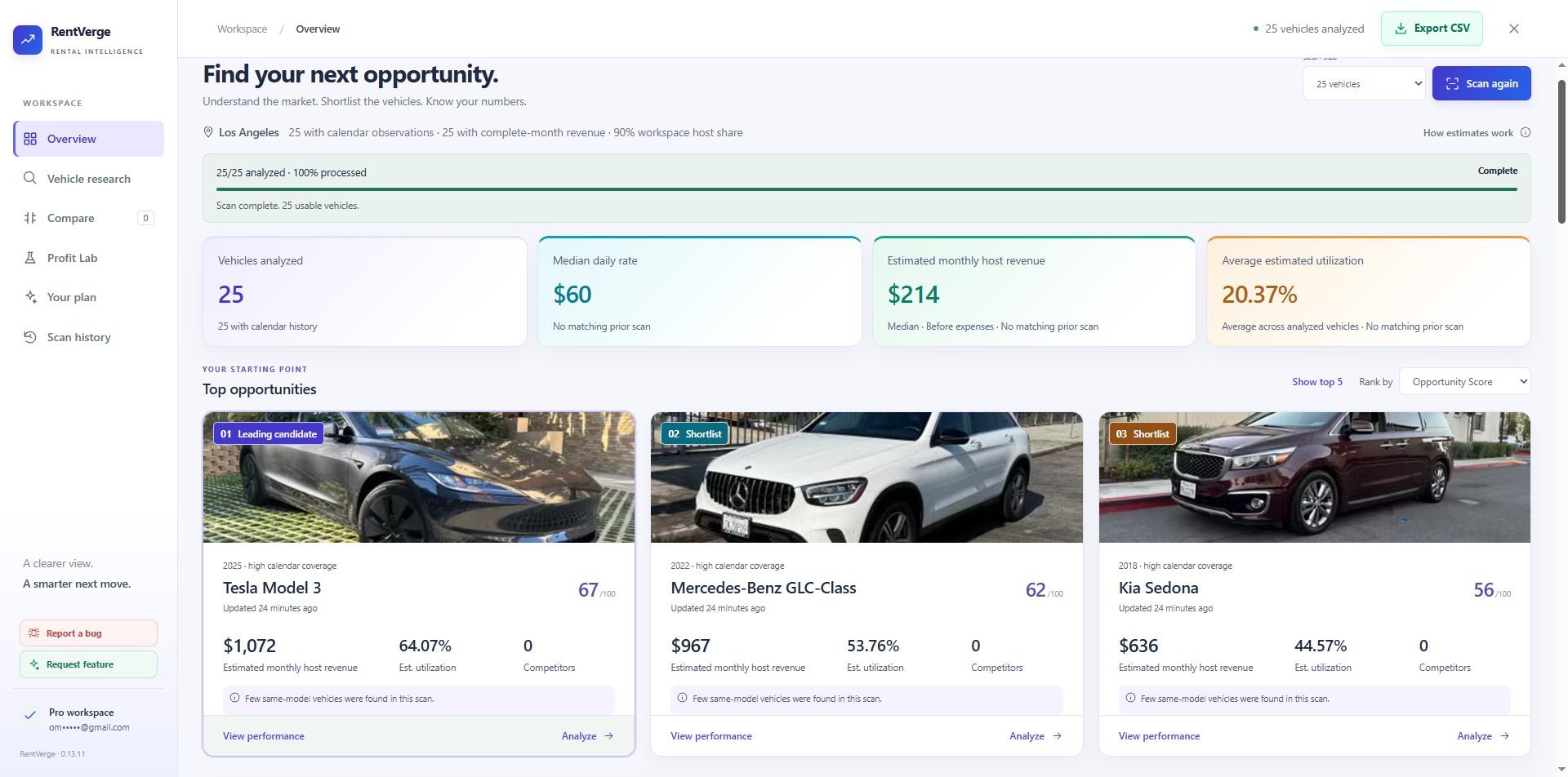
Actual product demonstration. Revenue, utilization, and profit figures are research estimates.
See supply, daily rates, estimated revenue, and utilization together.
Look beyond the vehicle photo. Compare the signals behind each candidate.
Bring financing, running costs, depreciation, and resale into the decision.
TAKE A CLOSER LOOK
Follow the research from your first market scan to the assumptions behind your final choice.
Explore market-level metrics and ranked opportunities. Spot candidates to investigate without assembling a spreadsheet.
GO BEYOND THE LISTING
Open a dedicated vehicle view for revenue estimates, utilization, trips, competition, and performance history.
Calendar availability is a demand signal, not confirmation of a booking.
Set your purchase price, financing, and operating costs. Explore how the assumptions change estimated cash flow and ownership economics.
Compare up to three finalists side by side, using each vehicle’s own assumptions. See how opportunity, utilization, and economics line up.
Real product views. Estimates depend on available data and your assumptions.
A CLOSER LOOK AT PROFIT LAB
See how purchase and operating costs fit alongside revenue estimates before you commit to a vehicle.
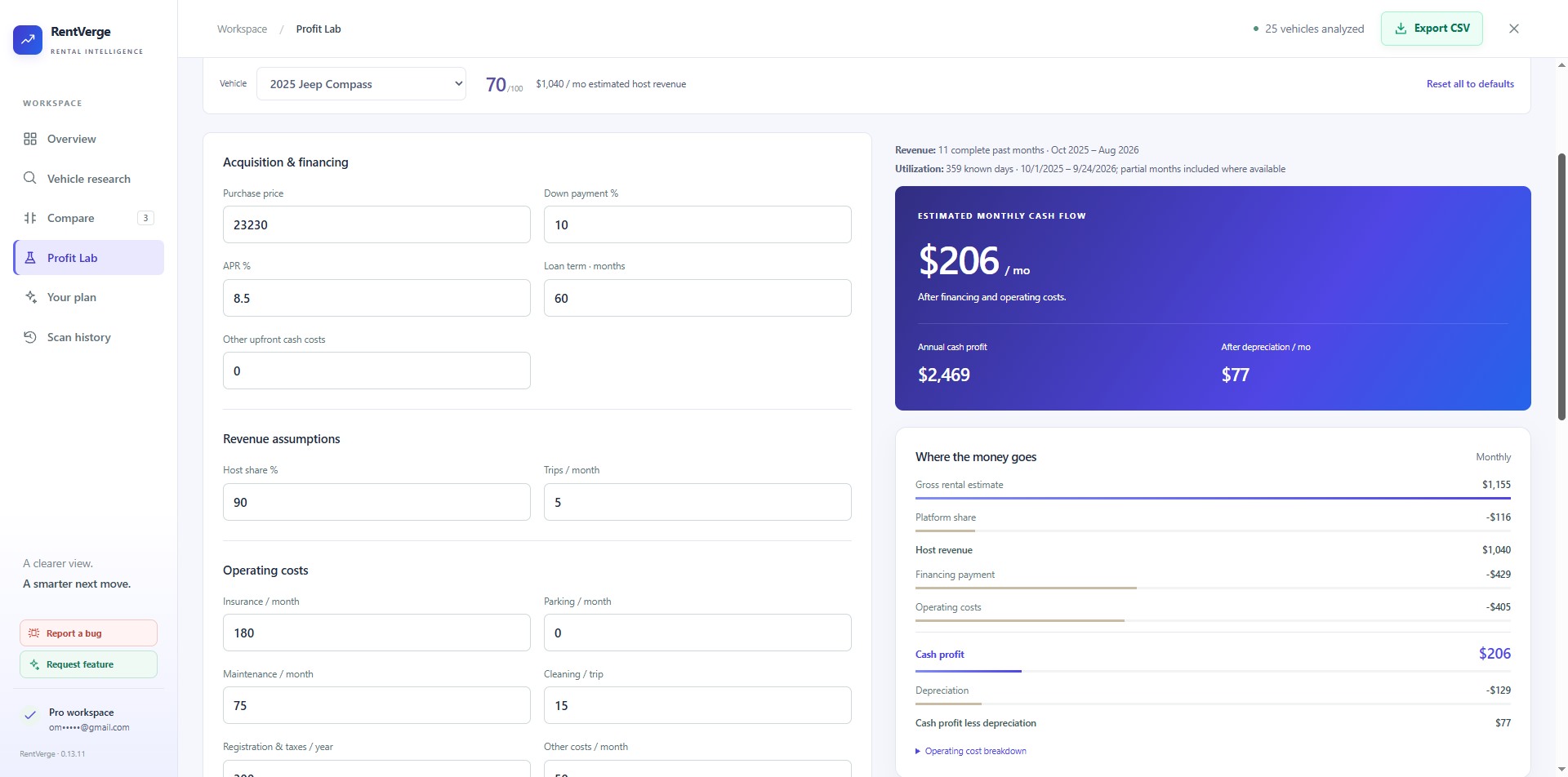
Enter your purchase price, down payment, interest rate, and loan term. Keep the assumptions specific to your situation.
See estimated cash flow after financing and operating costs, with depreciation shown separately.
Close-ups from the actual product. Example figures illustrate the workflow; they are not a promise of earnings.
YOUR FIRST SCAN STARTS HERE
Add to Chrome — FreeInstall from the Chrome Web Store. Pin RentVerge to your toolbar, open it, and follow the account prompts to sign in.
Choose your location and dates on Turo, then open RentVerge from the Chrome toolbar on a supported search page.
Run your first scan, explore the captured listings, and build a shortlist. Upgrade to Pro for vehicle comparison and Profit Lab.
Start free: 3 scans per day · 5 listings per scan · No credit card required
CHOOSE YOUR RESEARCH DEPTH
Try the workflow with the free plan. Pro gives you full captured results, all scan sizes, comparison, and Profit Lab.
3 scans per day · 5 listings per scan · No credit card
Add to Chrome — Free ↗Regular price: $25.99/month
For an active search, with the flexibility to cancel your subscription.
2-day free trialThen $12.99/month until canceled.
Equivalent to $9.99/month, billed $119.88 annually. Save about 23% versus paying monthly for a year.
For hosts who research throughout the year. One annual payment.
2-day free trialThen $119.88/year until canceled.
Regular price: $498 one-time
Pro access for the supported life of RentVerge, with no recurring subscription.
Use your RentVerge account email at checkout. After checkout, return to the extension and select Refresh access. Your Pro features become available when the upgrade is reflected in your account.
Monthly and yearly plans renew until canceled. Trial terms and the first charge are shown at checkout. The free plan does not require a credit card. Applicable taxes are shown at checkout. Turo availability and request limits apply; scans can pause or return partial results.
Yes. The free plan includes 3 scans per day with 5 listings per scan. Pro unlocks full captured results and all available scan sizes.
Purchase using the same email as your RentVerge account. Open the extension and select Refresh access after checkout. If Pro is not showing, confirm the account email and contact support@rentverge.com for help.
No. Revenue, utilization, and profit figures are research estimates. Actual bookings, expenses, and resale values can differ. Calendar availability does not confirm bookings.
Yes. Profit Lab lets you adjust purchase price, down payment, interest rate, loan term, operating costs, depreciation, and resale assumptions.
Install RentVerge in desktop Chrome and use it on supported Turo search pages. Coverage and available signals can vary by market and listing.
A one-time payment for Pro access for the supported life of the RentVerge product. It is not tied to your lifetime and does not include unrelated future products.
No. RentVerge is an independent research product from Merchsignal LLC. It is not affiliated with, endorsed by, or sponsored by Turo.
MAKE RESEARCH YOUR ADVANTAGE
Add to Chrome — Free Chrome extension for Turo research · Free plan · No credit card required.